

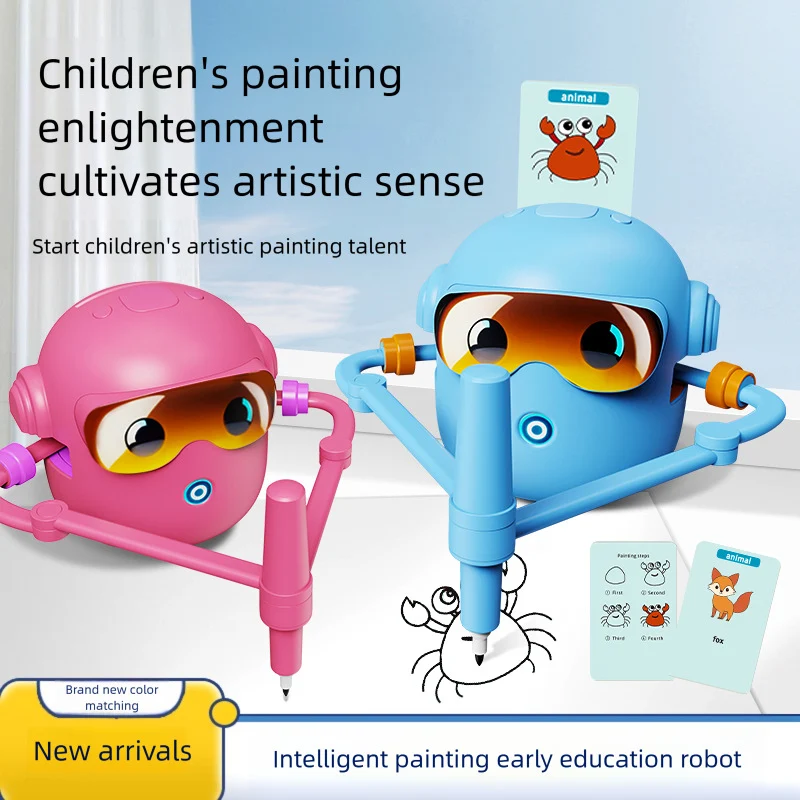


JQR-02 Drawing Robot: Watch a Picture Form and Try Your Own Version
Color
| Brand | Wonder Kids Toy |
|---|---|
| SKU | SU00063243-Jqr-02 pink |
| Type | Drawing Robots |
| Color | Jqr-02 pink, Jqr-02 blue |
| Variants | 2 |
WonderKidsToy · Explore through play
JQR-02 Drawing Robot · Pink or Blue
Watch a picture begin. Let their ideas take it further.
A moving pen, a growing outline and a picture to talk about. The JQR-02 drawing robot gives art time a visible starting point, using its pen-holding arms to draw on paper.
Choose the pink or blue version for this card-guided drawing format. Watch the lines take shape, then invite your child to make their own marks, add colours or invent a story around the finished outline using your own suitable art materials.
Follow their curiosity
Turn watching into an invitation to create.
A picture in progress gives you details to notice together: a curve, an outline or a familiar shape. After the robot finishes and its moving parts have stopped, the drawing can become a starting point for your child’s own creative choices.
See the process unfold.
Observe how separate lines contribute to a picture. Invite your child to describe one detail they noticed or predict which part of the outline might appear next.
Begin with a prompt.
The illustrated cards shown with the model provide subjects for drawing. Introduce compatible cards according to the instructions and let your child help choose a starting point.
Make room for their own art.
Use the result as a reference for drawing by hand, or add colours and a setting afterwards. Your child can try one small detail instead of copying the whole picture.
Talk about an idea.
A drawing creates a shared focus for conversation. Ask what is happening in the picture or what your child would like to add, then follow their explanation.
Learning through the activity
Notice, describe and try a little drawing.
The creative practice happens when children join in: observing an outline, explaining a choice or drawing by hand after the demonstration. Keep the invitation flexible so watching the robot becomes the beginning of the session rather than its only activity.
Try a question that leaves room to think.
- Which line did you notice first?
- What would you add to this picture?
- Can you tell a story about your drawing?
Let your child look, try and explain at their own pace.
A fresh invitation for another session
Three ways to explore together.
ACTIVITY 01
Look for one shape.
Watch a supervised demonstration and choose one shape to discuss. Once the robot has stopped, invite your child to try that shape on separate paper with their own suitable drawing tools.
ACTIVITY 02
Invent a setting.
After the drawing is complete, move the paper clear of the robot. Let your child add somewhere for the picture to belong, such as a garden, a room or an imagined landscape.
ACTIVITY 03
Tell the next scene.
Use the finished picture to begin a short story. Ask what might happen next, then draw another scene by hand. Let the child choose how detailed the story becomes.
Make time for a shared discovery
Let your child show you their thinking.
Offer a simple invitation after the demonstration: “What would you like to try?” Your child might copy a line, add a background or explain a story. Celebrate their choices without expecting their drawing to match the robot’s outline.
Details that help you choose
Know your selected product and configuration.
Choose your preferred option in the product selector above this description. Check its full name in your cart before completing your order.
A thoughtful gift or a shared afternoon
Choose for the child’s interests.
For a child interested in robots and drawing, the JQR-02 combines a mechanical demonstration with a paper-based creative activity. Check the supplied age guidance and help with setup. Confirm the actual card and pen quantities when choosing a gift, since this listing is separate from other drawing-robot bundles.
Keep the next session easy to begin.
Use a clear, level, dry surface and keep hands and loose objects away from the moving arms. Stop the robot before adjusting paper or tools. Follow the model’s charging and care instructions and keep the matching accessories together.
Useful answers before ordering
Commonly Asked Questions by Parents
It holds a pen in moving arms to draw on paper. The gallery shows illustrated cards positioned at the top and picture outlines forming underneath. Follow the model’s setup instructions.
Which colours are available?The options are Jqr-02 pink and Jqr-02 blue. Choose one robot colour and check the full variant name in your cart before ordering.
Does this listing include 100 drawing cards?A 100-card quantity is not verified for this JQR-02 listing. Do not transfer the package contents of a different drawing-robot product to this model.
Are drawing cards and pens shown with the robot?Yes, the gallery shows illustrated cards and drawing pens. Exact supplied quantities and replacement-pen compatibility need model-specific confirmation if important to your purchase.
Does it use a rechargeable battery?The documented JQR-02 model uses a built-in rechargeable lithium battery. Follow the supplied charging instructions; do not assume a charging method from another robot model.
Are a charging cable and wall adapter included?A USB charging cable and wall adapter are not confirmed as included with this listing. Confirm the package contents before ordering if you need those accessories.
Can children add to the finished picture?Yes. After the robot finishes and stops, move the page aside and use suitable art materials to colour, add a setting or continue the picture by hand.
Is it a coding or app-controlled robot?Coding, app control and programming functions are not established features of this listing. The documented activity is card-guided drawing on paper using moving pen arms.
Does it teach drawing automatically?It provides a drawing to observe and an optional starting point for practice. Encourage children to make their own attempts; no particular improvement in drawing ability is guaranteed.
What spoken language does the JQR-02 use?Spoken-language features are not verified in this product record. Pink and blue identify the robot colours; they do not confirm English speech or another language.
How should we prepare the drawing space?Use a clear, level surface and position paper, pen and compatible card as directed. Keep hands, hair and loose objects away from the arms while the robot is operating.
What age is the JQR-02 suitable for?Use the manufacturer’s age label and warnings supplied with this model. A verified age range is not established here. An adult should help with setup and supervise the activity.
What should I compare before buying?Check the JQR-02 colour, exact accessories, charging contents and any language features you require. Keep its specifications separate from the store’s pink or green 100-card drawing-robot listing.
Bring a little discovery to playtime
Make room for their next idea.
Review the product details, choose the configuration that suits your plans and enjoy exploring the activity together.
Compare drawing robots for your next art session
Explore the drawing robot toys collection and our drawing robot buying guide. Use each model’s selected option for its own card, control and power details. Invite your child to add their own colors or background after following the model’s setup instructions.
Questions about this product
Is JQR-02 Drawing Robot: Watch a Picture Form and Try Your Own Version in stock?
Yes — 46 units are available and ready to ship from our US warehouse.
How fast will JQR-02 Drawing Robot: Watch a Picture Form and Try Your Own Version ship?
Orders placed before 3:00 PM ET ship the same business day. Delivery takes 3–5 business days inside the USA.
What color options does JQR-02 Drawing Robot: Watch a Picture Form and Try Your Own Version come in?
Available color: Jqr-02 pink, Jqr-02 blue. 2 variants in total, each with its own SKU and price.
Where does JQR-02 Drawing Robot: Watch a Picture Form and Try Your Own Version ship from?
It ships from the United States. Standard delivery is 3–5 business days, and orders placed before 3:00 PM ET go out the same day.
All variants (2)
| Color | SKU | Price | Stock |
|---|---|---|---|
| Jqr-02 pink | SU00063243-Jqr-02 pink | $11.70 | In stock |
| Jqr-02 blue | SU00063243-Jqr-02 blue | $11.70 | In stock |